Showing posts with label Collaboration. Show all posts

Wednesday, 11 May 2016

Day 162: Using Plasticine To Make A Digital Book Come Alive

This collaboration project began at the Reading For the Love of It conference when we attended a session by Barbara Reid. She inspired  us by her techniques and her plasticine artwork.  Using real examples, she talked about projects she had done with students.  Her clear step by step instructions and student examples, made us feel  that it was something we could definitely do with our students.

We do character ed assemblies at East Oro P.S.  and we were emphasizing "Honesty" as March's character trait.  We chose Franklin Fibs because we thought the kids would really enjoy making the animals out of plasticine.  We needed a book of a good length, easy for them to read and follow  the story.  

Here's the finished copy of our digital book, Franklin Fibs!


To begin, our Grade 2 students started practising to use the techniques with plasticine that were modelled on YouTube and in a variety of Barbara Reid books.  Students were exploring colour mixing, using tools and various techniques by creating an outdoor picture that could show anything they wanted.  

In our Grade 2 class, we co-created success criteria for expressive oral language that should be used when presenting a poem or other oral reading.

Then we read the Franklin story and talked about the message.  They were each given a page of text that they needed to sketch with paper, pencil and pencil crayons.  We discussed the need to simplify the picture, knowing that the next step would involve plasticine.  This part surprised us, as students were able to focus on the  important  aspects of their picture.  Then they had to use their sketch, placed beside a cardboard base to begin creating their plasticine image.  This stage took 4-5 sessions to build the background, add the details and  textures to come up with their finished product.  Then the students practiced reading aloud their text to match their image according to the success criteria.  We photographed each picture using the camera on an iPad.

Watch our "How-to" video made in iMovie

In the app, Adobe Voice (available on  the Airwatch catalogue for teachers who sign up for a free account) we added the photos from the camera roll, then had each student record their section of the story.  Later, we were able to tap and drag the photo/recordings into the proper sequence.  We then added the music from the choices available in the app.  An important tip is to turn the volume down to make sure student voice can be heard clearly over the music.

Lora Langner and Jenn Fyfe


Wednesday, 10 February 2016

Day 102: CODE Robotics Inquiry Launch at Prodomax


Scratch Dance Pad
The CODE Robotics Project is an opportunity for elementary students, from 13 participating schools, to engage in learning through robotics, leading to opportunities for the development of interactive, collaborative, entrepreneurial and problem solving skills.

To launch our inquiry we brought together a group of educators and co-op students, from the participating schools, for a day of hands on learning around robotics, STEAM and coding at Prodomax in Barrie. The teachers and co-op students were challenged through a series of gamified exploration spaces including: a WeDo coding table, EV3 coding space, robot maze with Dash and Dot, a Sphero Pollock Art activity, a virtual reality table (with Google Cardboard), Bayblade building battle with WeDo, a Scratch Dance Pad and a building station. After completing a challenge at one of the hands on learning stations, educators could award themselves a badge and check out their progress on the summary board.


Prodomax by @HT_Library08

We also had an opportunity to go on a tour of Prodomax and see real world examples of robotics in action. We would like to thank Prodomax for welcoming us today into their environment, which inspired our learning and gave it context. A special thank you to Jane McPherson, Bill Richardson and Marc Lemieux for sharing their knowledge with us, helping the day run smoothly and for the engaging tours!


In the afternoon we learned more about the EV3 robots through an interactive series of activities led by Ramy, Chris and Paul from Logics Academy. We were challenged to problem solve and think critically while exploring and creating with the EV3. With great support, we soon felt confident that we could take our robotic skills to the next level and creating our own programs!

See a Storify summary of the Tweets from our day of learning: CODE Robotics Inquiry Launch Tweets.

For SCDSB educators, check out our CODE Robotics Learning Story.

Follow #SCDSBbot on Twitter and our website http://scdsbbot.blogspot.ca/ to learn more.

Tyler Cave, Amy Szerminska, Chris Gilewicz, Marci Duncan and Pat Miller

Thursday, 28 January 2016

Day 93: Mentoring Through Digital Media

If you want to learn some specific skills, why not call in an expert? 

Many schools across the county are preparing to participate in the upcoming SCDSBLive Radio Expo. In order to support the teachers and students to build some background knowledge for the project, we decided to call on a newly trained expert! Brad MacDonald, is a former student of Elmvale District High School. Before that, he attended Huronia Centennial Elementary School...and that's where he went today. 


Brad generously spent part of this morning sharing his knowledge about making effective audio recordings. In order to capture his advice and share it further, we decided to make a video recording using the school's iOgrapher kit and enlisted the help of some grade six and eight students. It was exciting to hear Brad talk about his experience as a news reader on CBC Radio One in Windsor after graduating from Humber with a degree in Journalism.  He taught us lots of "lingo" from the industry, explaining that reporters refer to their tripod as their "sticks" and the light on their camera as the "sun gun". Brad went on to give many practical suggestions for making effective audio recordings. 

Here's an example of an actual script that Brad used on one of his CBC Radio One newscasts.  


Be sure to check out the #SCDSBLive website where the full version of the video will be posted soon. You'll also find the complete list of categories for the "contest" including news reports, music spots, creative stories and many more. Share your learning in a new, creative way.  Be inspired and inspire others...just like Brad did.

Wednesday, 2 December 2015

Day 62: Taking Risks

Recently, Kit Luce and I had the opportunity to spend time with intermediate teachers at Worsley Elementary School in Wasaga Beach.  A number of important ideas came out of our learning with the teachers and students.  One particular overarching theme that existed throughout the week centred around “Taking Risks”.  
Going into schools classrooms and planning lessons for students we do not know can seem risky.  We could only make educated guesses about whether we would be meeting their needs.  There may be a perception that we have the answers...when, in reality, we are coming in with questions and just as eager to learn with the classroom teachers and with the students.
The teachers take risks also.  They invite us into their rooms and we are grateful for that.  We get to see varied classroom setups, amazing approaches to teaching and it gives us the opportunity to learn from and WITH the teachers.
Lastly, we saw risk taking by the grade 7 and 8 students in how they responded to having us in their learning space. The students were incredibly kind and gracious with us.  We know very little about them and they gave us their time and attention and shared their thinking with us.  We recognized that they extended the trust they have in their teachers to us. We appreciate that and do not take it lightly.
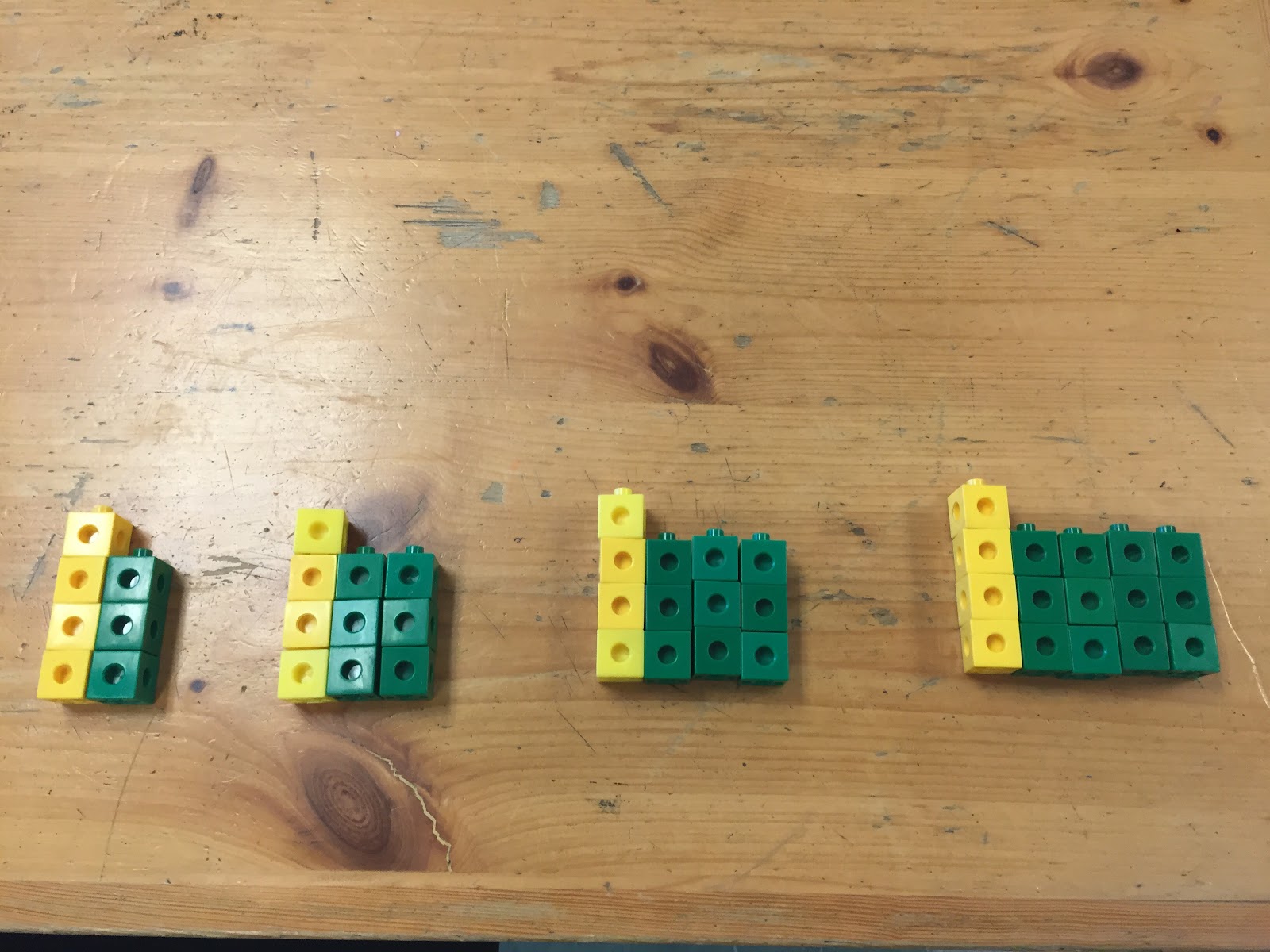
Another conclusion we came to was the importance of Consolidation in math lessons. Our focus was to show how we could meet the needs of diverse learners in the classroom through the use of manipulatives and open and parallel tasks. Varied representations of algebraic expressions provided for multiple entry points for student understanding.
The task:
Roll a number cube twice to fill in the blanks in this pattern rule:  Start at ____, increase by ____
(no snake eyes)
  • represent this pattern using manipulatives, creating the first 4 terms
  • on your white board,  represent this pattern visually, using a table of values, numerically, graphically?
What would be 10th term?
Challenge? What would be the 100th term?
                   How can you determine an algebraic expression for your pattern?
When we looked at the patterns created we focused on the connections between the visual representations and the table of values in order to develop the algebraic expression.


IMG_0628.JPG   IMG_5458.JPGIMG_0034.JPG
What we recognized was that consolidating conceptual understanding is essential everyday, even if the concept is revisited the next day.  The consolidation phase is where we remove the context from the activity.  This deconstruction provides students with the understanding and, hopefully, the confidence to practice and grasp the learning goal.
Thank you to Mrs. Campbell, Mrs. Hamilton, Mr. Ferris, Mr. Pike, Mr. McLean and Mr. Kemp at Worsley Elementary School for your professionalism, enthusiasm and guidance.

Tuesday, 10 November 2015

Day 46- Coding and Simple Circuits Come Alive Through the Arts


Join us throughout the day today at Nottawa Public School as we explore artbots, coding Spheros to complete tasks and collaborative art pieces...and a whole lot of STEAM fun with grades 1 -6!

Block 1 : Artbots- Gr.4/5/6 - 50+students 


With a quick lesson on simple circuits, and a reminder about forces causing movement, these Grade 4,5&6's were ready to rock and roll with their artbot prototypes. Iteration was key and embraced whole-heartedly as they worked through the design cycle / creative process to solve problems and step up to their challenge.

The challenge:


I find it essential to not show a prototype or exemplar of what an artbot could look like. We're not looking for replication, but rather inspiring creativity and innovation by presenting a challenge and the tools required to create it. It never ceases to amaze me how different each and every artbot can be when left to the creative genius of the group. Cue #theartoflettinggo
Some vibrate, some squirm, some spin...but they all dance and make their mark on the world. It is a great reminder for students that we can all be so different, yet accomplish tasks in our own way and leave a positive and unique mark on the world...just like our artbots. Teachable moments make the most of any design challenge as students are directed to think and extend upon their own schema in math, science, technology, engineering and the arts.

What's an artbot without a dance battle? #bettertogether has never been truer!
After prototyping, students were invited to create a collaborative art piece, contemplating the concepts of colour, balance and line while composing the collective piece. A masterpiece was born!


Block 2: Coding Spheros with the 'Tickle' App- Grade 3&4

If you're going to learn to code, let's add some movement! None of these kids had coded before, but before long they were coding like pros and make their Sphero's perform planned tasks! These kids were fully engaged in learning how to use the technology as a tool and not just a toy...although that doesn't mean that a whole lot of fun wasn't to be had as well!

What we did:
Step 1- visual intro to scratch/blockly style coding ( it's just like Lego!)
Step 2- mini lessons on degrees and speed vs. time variables
Step 3- Code the teacher! Be silly and have them recognize how precise commands need to be to execute a simple task, like walking a straight line 90 degrees to your right that is 5 meters long.
Step 4- predict what some sample lines of code will allow their Spheros to do by 'acting it out'. It's a drama technique, a math strategy, a kinesthetic learning technique and yep...a STEAM strategy too.


Can you act out this code? Try it! A lot of body awareness and geometry was happening to determine that this code makes a square.


Step 6: Code your sphero to follow a line or shape in the tile on the floor! How fun! And all in 50mins ;)


Block 3: Jackson Pollock inspired art created by coding Spheros to colour mix- Grade 1/2

This may have been the highlight of my day. I'll be honest with you, I have grandiose ideas at times and tend to trust that something amazing will happen...even and especially if it doesn't all go according to plan. But a plan I had. Where it goes is up to the students... and that is always the best part of the adventure!
Grade 1's, non readers, never coded before, paint, end of the day and robots. What could be more exciting to take a leap of faith into!!!


What we did:
1. Leaving our mark: write your name and draw a picture that represents who you are anywhere on the paper with markers- 5mins.
2. Learn to code- act it out. 
The pinnacle highlight of my day was when a little girl who recognized me from when I had worked with her in summer school this past summer (great difficulty with reading, writing and paper/pencil tasks in general), explained that if we had to code our teacher to walk a square, 'they need to take 4 steps because the other side was 4 steps and all the sides of a square have to be the same number of steps". I almost cried. Amazing right! If we hadn't given that child the opportunity to express their mathematical learning in a different way, we would never have known how much they really knew and understood. Yay for movement integration in all that we do!
3. Use the Tickle app code template and change the variables of time or speed or rotation to change the trajectory of your sphero.


Next...add paint of course!


I must thank my husband for suggesting the garden hose as a sphero fence...brilliant! And a BIG thanks to Chris Gilewicz for picking up a drop sheet and dropping in to play with us at Nottawa this afternoon!
As I sit here wrapping up this blog and tidying up for home this evening, I can hear the kids in YMCA homeport showing their parents the art that they made today just down the hall. I'm pretty sure mini motors and Spheros are on a few Christmas wish lists in Nottawa this year. ;)


Friday, 30 October 2015

Day 39: Video Announcements

At Byng PS we always struggle to find the best time for morning announcements. Often the kindergarten students are in the coat area and are not yet into the classroom.  If you wait for the kindergarten students then it falls in the middle of the intermediate lesson. The idea was born to do video announcements.


On the day before, staff and students put any announcements in the announcement binder. Students take the announcement binder and use the ipad (Green Screen by Do Ink) app to video, then import the videos into imovie. At a staff meeting towards the end of last year all staff were given the time and training to get established on google drive. The videos are shared on the google drive each day. Each classroom chooses the best time to show the video in their classroom with the least amount of interruptions.


Our goal is to have the students independently create our announcements and a teacher only needed to supervise the filming.  In collaboration with our board’s Innovation team, we will be running a student workshop to develop student ability to generate ideas, plan, conduct interviews, present orally in an effective way, film preproduction and post production.


Students will develop various segments that will be incorporated into the announcements on different days of the week.  For example, we currently include a segment called “Things that Make you Go Hmmmmm” where the students choose a photo that encourages classes to discuss questions related to the photo.  We are looking forward to classrooms sharing their learning and successes through photos or video in the shared video announcement google drive folder and then incorporating these clips into our announcements.  We are hoping that creating an extended audience for student work will help to engage them in their learning.


Our video announcements are a work in progress but we are looking forward to our continued growth!

If you have any questions please contact us: Lesia Collicutt and Joanne Larmer

Thursday, 29 October 2015

Day 38: Dreaming as Big as We Can

Recently, I had the opportunity to spend a day visiting the grade 12 World Issues class at Nottawasaga Pines Secondary School. What a visit! The class is currently engaged in an inquiry project related to the United Nations 17 Global Goals for Sustainable Development. I should also add that their teacher is involved in New Pedagogies for Deep Learning.


The class established a goal: to educate others about the UN Sustainability Goals and to prompt people to take action to achieve these goals. Based on the interest they felt most connected to and the issues they felt passionate about, students divided into seven groups. Each group chose one of the 17 global goals to focus on. (#npssglobalgoals)


This inquiry project had some parameters established by the teacher. Student work had to include:
  • learning about the issue
  • sharing learning with others  
  • blogging about it and using social media to help achieve their goal
  • taking action - at a local level and a global level
  • identifying connections to Fullan’s Six Cs
  • documenting their learning journey


For me, part of being in the class for the day involved interviewing some of the students about their learning as they launched into this project. I have to admit, I was quite emotional as I listened to what students had to say about their learning, their teacher, the choice and trust that was given to them, the risks they were taking, and the fact that they felt empowered to make a real difference. As one student said, “Dreaming as big as we can...going all out.” Their excitement was evident. I also found it interesting that not once did the conversation with these grade 12 students centre around marks. It was all about the learning, achieving their goal, working together and making a difference.  

The students have wonderful ideas about how they can share their learning and have already been very active in using social media to spread the word and in planning their local and global actions. They have already established partnerships with other departments in their school, community organizations, elementary schools, and global organizations. To get a glimpse of what is happening, check out their blog posts on: http://thegreentimberwolf.blogspot.ca/.

I can’t wait to see what happens as their learning continues. I am confident that this class will make a difference. Additionally, I believe the learning opportunities facilitated by their teacher will also make a difference in their lives in helping to foster a mindset and a skill set that will serve them long after their high school days.


Tuesday, 27 October 2015

Day 36: Vertical Non-Permanent Surface Learning

Recently I had the pleasure of observing a Vertical Math Day at Eastview Secondary School, courtesy of Lisa Peverill, @lmpeverill. This strategy has been adopted by the Mathematics department as one way to improve student engagement and learning. In this learning and teaching modality:
·         Students move from their desks to white or chalk boards located around the perimeter of the classroom.
·         In groups of 3 or 4, students explore mathematical challenges posed by the teacher. These challenges may be common or parallel in nature.
·         Groups collaborate within and across each other to construct mathematical meaning.
·         The teacher alternately moves from group to group, providing individualized support as needed, occasionally directing whole class attention to highlight key learning moments.                                         


Vertical Math has been a component of math instruction in a variety of courses, including Grades 9 and 10 Applied as well as Grade 12 Advanced Functions and Calculus and Vectors.


Why Vertical Math? These are the reasons cited by Alex Overwijk on his blog, a cited inspiration for the Eastview Mathematics Department:
·         Improves visibility.
·         Allows for transfer of knowledge around the room.
·         Non-Permanent removes fear of writing.
·         Formative assessment by teacher at all times.
·         Teacher can answer questions by having students look at others work.

Student Voice:
Vertical math ensures a high level of accountable talk! But what do students think about learning on Vertical Math days? Here is some excerpts from a student Google Forms survey given to a Grade 10 Applied class:


This profound impact on student engagement has drawn attention from Mathematics Chairs across SCDSB, some of whom have been visiting Eastview to see Vertical Math in action!


References:
SlamDunkMath, Alex Overwijk

Every Math Teacher in the World Should Do This...Right Now!, Nathan Kraft’s Blog


Monday, 26 October 2015

Day 35: Learning About Central Tendency - Just a short flight away…

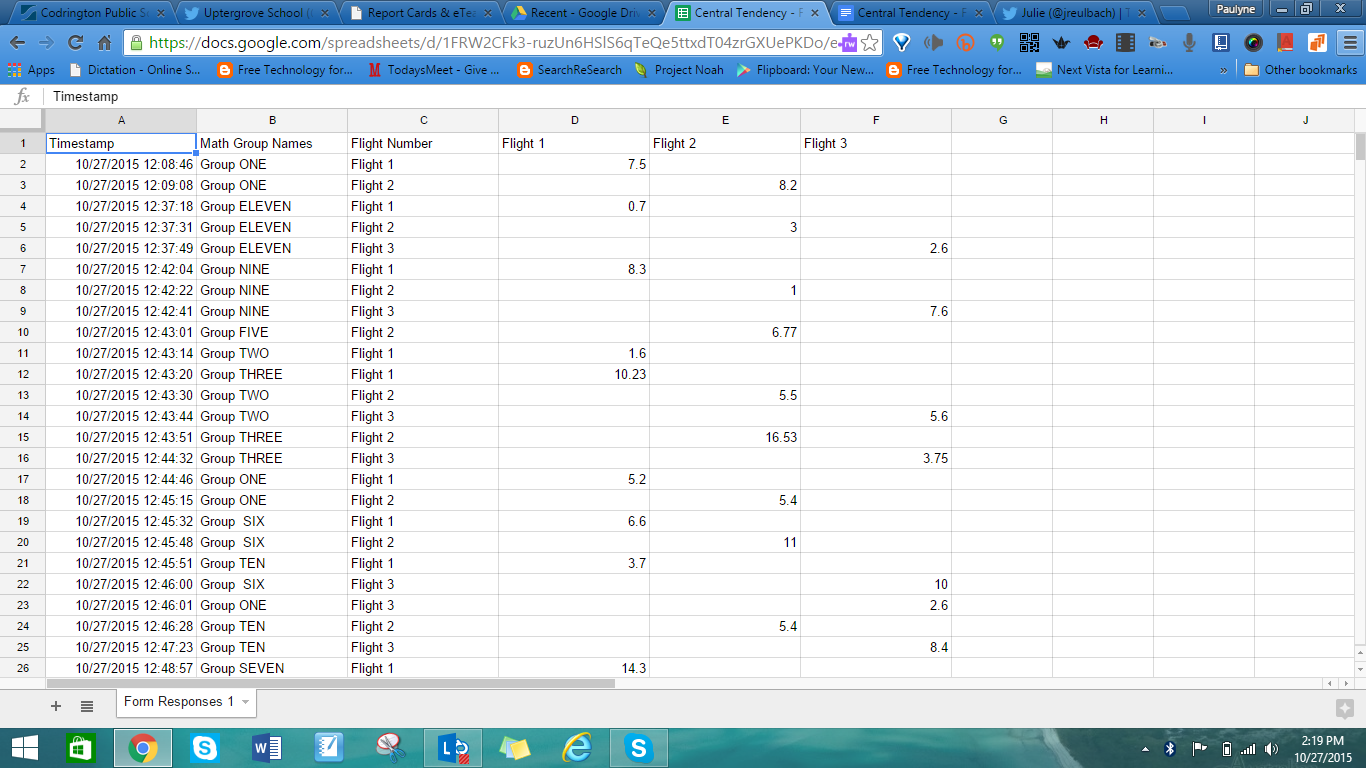
I have had a number of opportunities to spend time with some amazing grade 7 & 8 students in Mr. Clark's class at Uptergrove PS.  Today, the students were engaged in a Math lesson where, through investigation, they were asked to demonstrate how to apply an appropriate measure of central tendency needed to compare sets of student-created data.  After some discussion/paired activities in the minds-on and action portions of the lesson, the question was posed:
How might you use central tendency in YOUR world?
The plan:
  1. make a paper airplane with a small group (2-3 in a group)
  2. we’ll go outside and fly our planes (3 flights each)
  3. measure the distance of the flights
  4. record our distances
  5. input our data into the google form!
  6. compare and analyze data
  7. determine the best measure of central tendency in analyzing the data, apply it and explain why


Of course the students rose to the challenge…


What was the result?  Highly engaged students who co-created relevant sets of data to be measured in a meaningful learning environment.  


So, why hands-on math learning?
*Learning through concrete representations is engaging.
*Students get the opportunity to move about and get physically involved in the math they are learning.
*Manipulating physical objects can work as tools to help conceptualize understanding.


What an exceptional afternoon in a terrific, intermediate class!!  Thank you, Mr. Clark for the opportunity to co-plan and co-teach!!


NOTE: **This paper airplane idea was found at ispeakmath.org by Julie Reulbach.